

 katCompare
← The kat Suite · GitHub · Download
Compare files, directories and git refs, then merge just the changes you want.
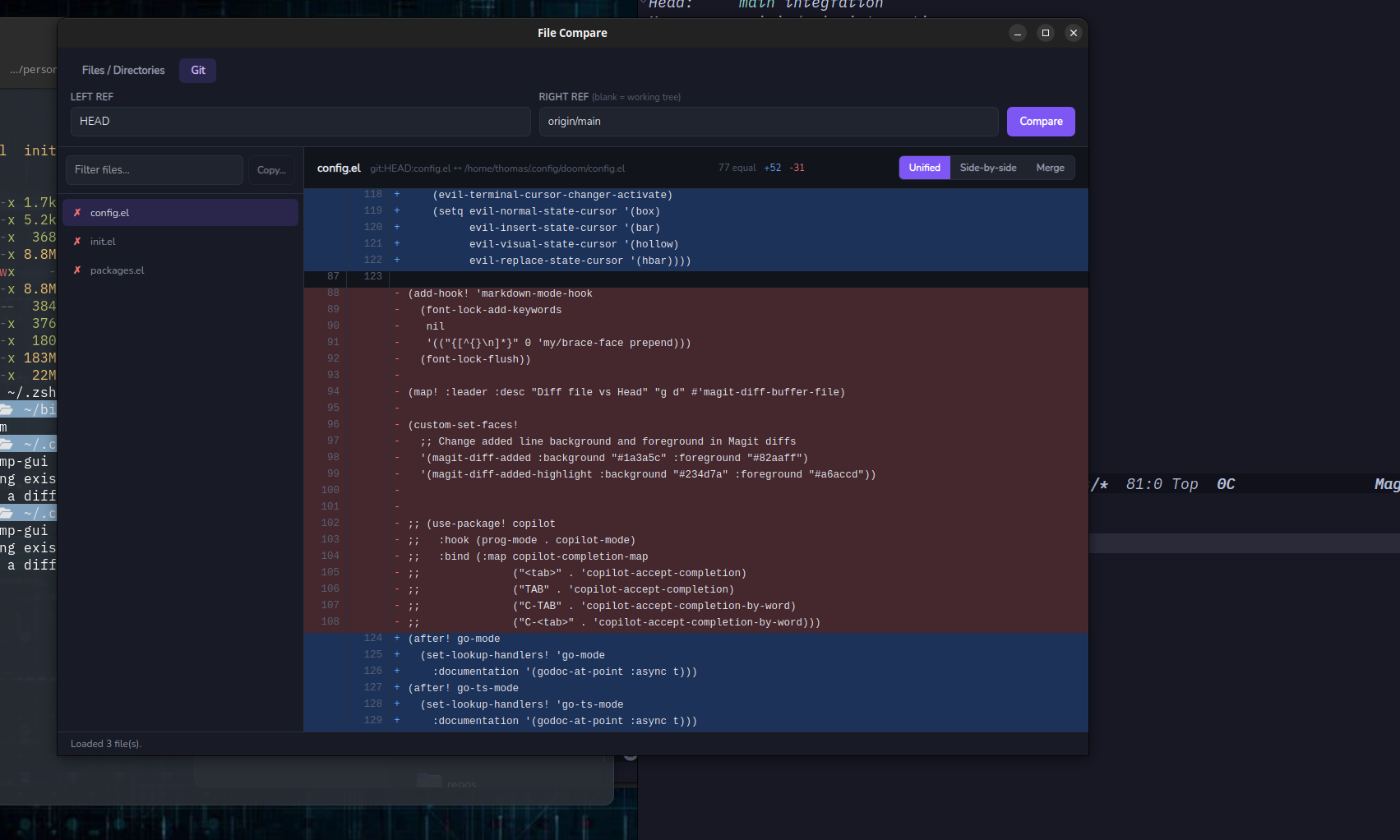
katCompare is a fast, color-coded diff and merge tool written in Go. It ships two ways from one engine: a native desktop app (Wails) and a keyboard-driven terminal UI (Bubble Tea). I also wrote it to be easier for red/green color-blind people to use, because I'm tired of every diff tool defaulting to red and green. Here additions are blue.
Features
- 🎨 Readable diffs: blue for additions, red for deletions, with old/new line numbers and live
+added / -deletedcounts - 👥 Unified or side-by-side views, switchable instantly while staying on the same line
- 🌱 Git-aware: diff any ref against another ref or against your working tree
- 📁 Whole-directory comparison: recursively finds every text file on both sides and marks identical (✓), different (✗) and one-side-only files
- 🔀 Cherry-pick merging: tick individual lines or whole blocks and save them over the target file (the old version is kept as
.orig), and each save is checked afterwards - ⚔️ Git conflict resolver: step through each conflict, take ours, theirs or both, then save and
git add - 📋 Directory sync: copy files that exist on only one side into the other, either direction
- ✏️ Hand off to your own tools: open a file in your editor at the line you're looking at, send the pair to your external diff tool (meld, kdiff3, VS Code, nvimdiff…), or run
git mergetool. That makes it easy to use katCompare as just a diff viewer if you want - 🔎 Filtering and path autocomplete
- ⚙️ Ignore rules for folders like
node_modules, and options to ignore line endings or whitespace - 🔍 60+ text file types recognized, plus anything else that looks like text
Terminal UI
katcmp                          # interactive path entry
katcmp old.yaml new.yaml        # two files
katcmp ./project-v1 ./project-v2   # two directories
katcmp --git HEAD~1             # a git ref vs the working tree
katcmp --git main feature-branch   # two refs
The file list sits beside the diff, and the diff follows the selection, so you can move through a folder and read each change without switching screens:
 katCompare  project-v1 ↔ project-v2                      5 files · 2 differ
╭─ Files 1/5 ──────────────╮╭─ long.txt · Unified · +1 -1 ─────────────────╮
│ ▶ ✗ long.txt             ││    19   line number 19                       │
│   ◄ onlyleft.txt    left ││▶   20 - line number 20                       │
│   ► onlyright.txt  right ││    20 + LINE NUMBER 20 changed               │
│   ✓ same.txt             ││    21   line number 21                       │
│   ◆ uni.txt         safe ││    22   line number 22                       │
╰──────────────────────────╯╰──────────────────────────────────────────────╯
 j/k move  Enter open diff  m merge  / filter  c copy  r reload  ? help
Main keys
| Key | Action |
|---|---|
j / k | move |
] / [ | next / previous change |
s | unified ⇄ side-by-side |
n / p | next / previous file |
m | merge (or resolve a git conflict) |
c | copy one-side-only files |
e / E | edit right / left file at the cursor line |
D | open in your external diff tool |
R | resolve with git mergetool |
x | swap left and right |
/ | filter the file list |
F2 / Ctrl+G | compare git refs |
? | help |
Desktop app
katcmp-gui has the same engine behind a point-and-click interface: a Files / Directories tab and a Git tab, unified and side-by-side views, a Merge view where you tick changes per line or per block, a Conflicts view with Ours / Theirs / Both cards, native file pickers, and path autocomplete. You can collapse the file list and paths bar or press Focus to give the diff the whole window. Fonts and sizes are configurable, and Ctrl+= / Ctrl+- zoom.
Settings
[compare]
ignore = ["node_modules", "dist", "*.log"]
show_hidden = false
hide_identical = false
ignore_line_endings = false
ignore_whitespace = "none"     # none | trailing | all

[view]
default_view = "unified"       # or "sidebyside"

[tools]
editor = ""                    # ahead of $KATCMP_EDITOR, $VISUAL and $EDITOR
Diff and merge tools come from your git config (diff.tool, merge.tool, diff.guitool), so you set them once. The TUI prefers terminal tools and the GUI prefers GUI tools.
Install
- Windows: download the installer. It installs per user, no admin needed
- Linux / macOS: the Linux GUI and the TUI for Linux, macOS and Windows are on the releases page
- From source, with Go, go-task, Node and the Wails v3 CLI:
git clone https://github.com/devinthemtn/katCompare.git
cd katCompare
task install       # installs katcmp (TUI) and katcmp-gui (GUI)
Under WSL, task install also installs the Windows builds and a katcmp-win wrapper. Use katcmp-win --wait when another program (like git difftool or katbackup) uses it as its diff tool.
